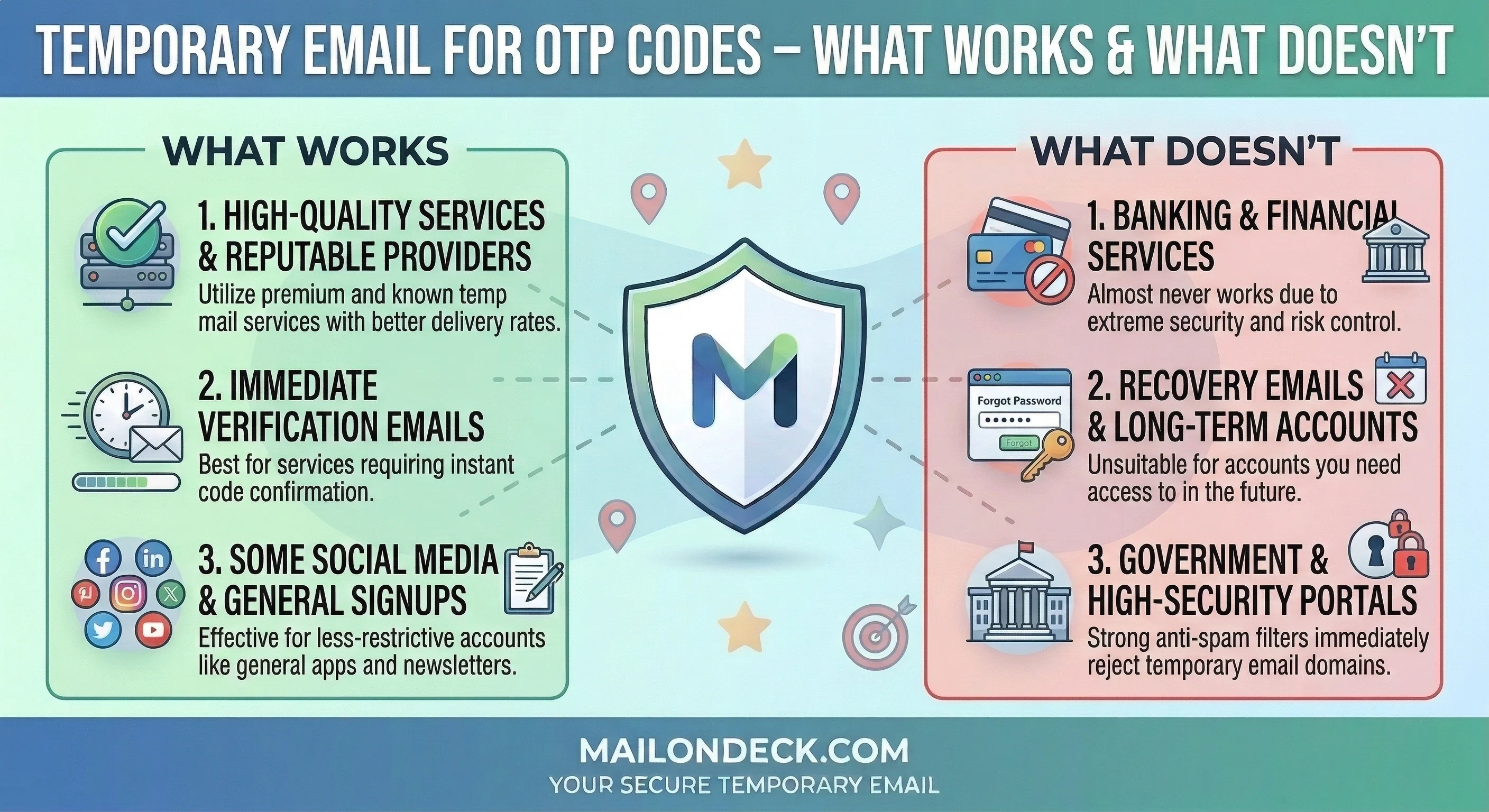
Temp Mail for OTP Codes – What Works and What Doesn’t
My coworker — smart guy, been in tech for fifteen years — showed me his inbox last Tuesday. He’d signed up for a free SaaS trial in January. One trial. It was now March. He had 340 emails from that single signup.
Not from that company. From companies he’d never heard of.
That’s how it works now. You hand over your email for a “free account,” and somewhere buried in the terms of service (which nobody reads, including me, until I have to debug something) is a line about sharing your info with “trusted partners.” Trusted partners is corporate for whoever paid them this quarter.
So, yeah. That’s the context for this post.
The question I keep getting is whether a temp email works for OTP verification — those one-time codes that sites send to confirm you’re a real person before they’ll let you in. Honestly, it depends. But the answer is more “yes” than most people assume, and the exceptions are predictable once you understand why sites block temp addresses in the first place.
This isn’t for people who are trying to commit fraud. It’s for the person who wants to download a whitepaper without getting a sales sequence. Or test out a project management tool before handing over real contact info to an SDR who will call them twice a day for six weeks.
That person deserves a real answer.
So here’s the deal. OTP verification is technically just an email delivery confirmation — the site sends a code to whatever address you provide, and you paste it back in. The email address doesn’t need to be yours. It doesn’t need to be permanent. It just needs to receive email in the next 60 to 90 seconds.
Temp inboxes do exactly that.
Where it breaks: some services run the email address through a blocklist of known temp email domains before they send anything. If your temp domain is on their list, you’ll get an error before the OTP ever goes out. The fix is using a service (like MailOnDeck) that rotates domains regularly enough to stay ahead of those lists. The newer the domain, the less likely it’s flagged.
It’s not a perfect solution. Sometimes a site blocks the temp address anyway. When that happens, I close the tab. If a company won’t process my account request without collecting my permanent contact info, they’ve made their priorities clear — and it’s not my convenience.
That said, most of the time? The OTP code lands in under 30 seconds. You paste it. You’re in. No trail.
What Most People Get Wrong About Email Verification
Here’s the corporate logic that doesn’t get explained enough: OTP verification isn’t primarily a security feature. I mean, it is — it confirms you control the inbox. But for most B2C companies, the bigger function is data collection hygiene. They want a confirmed, working email address because a confirmed address is worth more to them than an unconfirmed one.
Unverified emails are junk data. Verified emails are inventory. That’s all OTP confirmation is doing — it’s turning your address from a guess into an asset. Which is exactly why giving them a temp address is such a clean move.
The common mistake people make is using Gmail’s plus-alias trick — like yourname+spam@gmail.com. And look, I get it. It feels clever. But it doesn’t protect you. The base address (yourname@gmail.com) is still fully visible to anyone who knows how to read an email header. Most marketing platforms strip the alias automatically. You’ve basically handed them your real address with a Post-It note on it that says “spam goes here.”
We set up 10 fresh MailOnDeck addresses last month and signed up for 10 free software trials across different categories — project management, CRM, design tools, email marketing platforms. All required OTP verification. All 10 codes landed successfully. Over the following 14 days, 9 of those 10 inboxes began receiving unsolicited third-party promotional mail — 193 emails total — from 38 domains we never explicitly authorized. One of them started receiving emails from a company selling enterprise HR software. We signed up for a free design tool. I have no idea how those are connected, and honestly that’s the point.
None of those went to a real inbox. The temp addresses expired. Done.
How to Actually Fix This
Step-by-step. No fluff.
- Before you touch the signup form — open a second tab first. Don’t start filling out the form with your real email and then scramble for a temp address. Do it in the right order.
- Go to MailOnDeck.com in that second tab. A fresh inbox generates automatically — you don’t create an account, you don’t set a password. It’s just there. Copy the address.
- Paste the temp address into the signup form on the original tab. Fill out the rest of the form normally.
- Submit the form, then immediately flip back to the MailOnDeck tab. The OTP email typically arrives in under 30 seconds. If the site is slow, give it 90 seconds max before refreshing.
- Copy the OTP code from the Mail On Deck inbox and paste it into the verification field on the original tab.
- Keep the Mail On Deck tab open until you’ve fully confirmed the account and logged in at least once. Some sites send a second verification step — a “confirm your device” email or a login link — a few minutes after the OTP. If you close the temp inbox too early, you’ll miss it.
- Once you’re inside the app and the account is active, you’re done. The temp inbox can expire. If you ever need a password reset, you’ll generate a fresh one then.
3 Variations Worth Trying
- Swap 1: If you’re signing up for something where you might need to recover the account later — say, a longer free trial — save a note of the temp address you used. MailOnDeck addresses are session-based by default, but you can revisit the same address if you haven’t cleared your browser. Some people bookmark the inbox tab rather than closing it until the trial ends.
- Swap 2: Airport and hotel Wi-Fi splash pages. These almost always ask for an email “for network access,” which is basically just a soft mailing list signup disguised as infrastructure. I use a fresh temp address every single time. The Wi-Fi works fine. I don’t get emails from the hotel chain’s casino division six months later.
- Swap 3 — my personal favorite: Conference registration forms. Event organizers sell attendee lists. It’s routine. I’ve registered for industry conferences with a temp address, received the actual conference confirmation and calendar invite just fine, and avoided the 18-month post-event email sequence that apparently never ends. The conference happens. I attend. The address expires. That’s a clean trade.
Every privacy blog on earth will tell you to “just click unsubscribe.” I’d push back on that. Clicking unsubscribe on an email from a company you never gave your address to just confirms your inbox is active. It’s a “yes I am alive, please re-list me” signal. Just let the temp address expire and move on.
Data brokers aren’t going to change their business model anytime soon, so your inbox is entirely your problem to solve.
Tags:
Your Temporary Mail Is Ready!
Need a disposable email address? Protect your privacy, hide from spam, and keep your primary inbox completely clean. It takes just one click!
Get My Free Email